This tutorial assumes you are using any Microsoft Windows Operating System with Office 2010 (32 or 64bit) installed
Step 1: Enable the developer tab in Excel
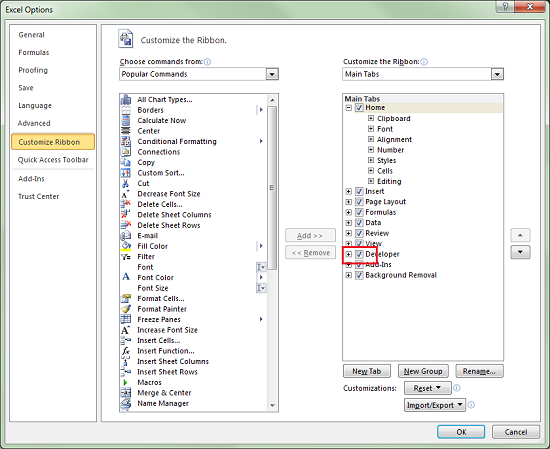
Start Excel, click on File, options and choose "Customize Ribbon". Then check the "Developer" checkbox in the right column.
Step 2: Add a reference to Microsoft Office Soap Type Library 3.0
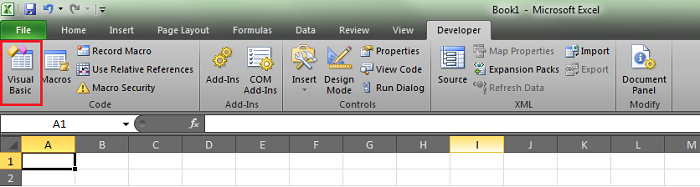
Open Visual Basic by going to the first option on the developer tab on the Ribbon.
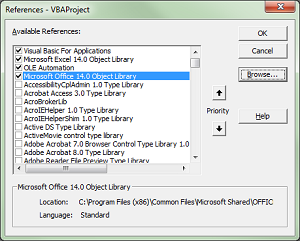
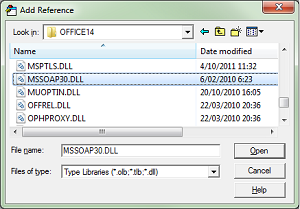
Scroll down the list of libraries and pick 'Microsoft Office Soap Type Library 3.0'
Step 3: Create a Visual Basic module using the Visual basic Editor
Add this piece of code by choosing Insert->Module. Copy this code into your Excel VBA module
Public Sub getGazetteerRecordsByMRGIDs()
  'call the webservice
  Dim SoapClient As SoapClient30
  Set SoapClient = New SoapClient30
  Dim WSDLPath As String
  WSDLPath = "https://marineregions.org/gazetteer.php??p=soap&wsdl=1"
  Call SoapClient.MSSoapInit(par_WSDLFile:=WSDLPath)

  'get MRGID value from cell
  Dim MRGID As Range
  Set MRGID = Worksheets("ByMRGID").Range("A5:A155")
  ' clear values from last request
  Worksheets("ByMRGID").Range("B3:O1000").ClearContents
  ' generate title row
    Const length As Integer = 15
    Dim Arr(length)
    Arr(1) = "MRGID"
    Arr(2) = "preferredGazetteerName"
    Arr(3) = "preferredGazetteerNameLang"
    Arr(4) = "placeType"
    Arr(5) = "latitude"
    Arr(6) = "longitude"
    Arr(7) = "minLatitude"
    Arr(8) = "maxLatitude"
    Arr(9) = "minLongitude"
    Arr(10) = "maxLongitude"
    Arr(11) = "precision"
    Arr(12) = "gazetteerSource"
    Arr(13) = "status"
    Arr(14) = "accepted"

  Dim Destination As Range
  Set Destination = Range("A2")
  Set Destination = Destination.Resize(1, UBound(Arr))
  Destination.Value = Arr
  'start output from row 3
  Dim Row As Integer
  Row = 3
  'get all the MRGID's in the A column
  For Each cell In MRGID
    'if cell is not empty
     If Len(cell.Value) > 0 Then
            Dim Item As Variant
            Dim i As Integer
            i = 0
            'loop the fields of the SoapClient
            For Each Item In SoapClient.getGazetteerRecordByMRGID(cell.Value)
              If i = 0 Then
              Else
                'check if the field is on the right spot and fill the cell
                    If Item.BaseName = Cells(2, i + 1) Then
                       Cells(Row, i + 1) = Item.Text
                    Else
                        For f = i + 1 To length
                            thing = Cells(2, f)
                            If Item.BaseName = thing Then
                                Cells(Row, f) = Item.Text
                            End If
                         Next f
                    End If
              End If
              i = i + 1
            Next
            Row = Row + 1

    Else
       Exit For
    End If
  Next
  Set SoapClient = Nothing
End Sub
Then close the VB Editor.
Step 3: Using the function in Excel
You can now link the function getGazetteerRecordsByMRGIDs to a button located in the "developer" tab, selecting "Insert" and button under "form controls".
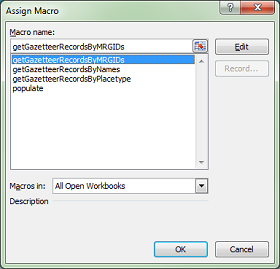
You can then right click the button and click "assign a macro..."
Select the macro getGazetteerRecordsByMRGIDs and click ok.
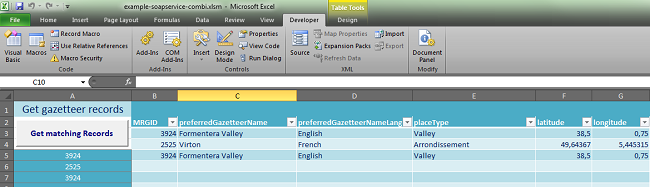
The result should be something like this:
Download this example.
[ back ]

